Pro tip for music lovers: Save over 800 RMB (approx. $120 USD) per year!
Step 1: Download the Installation Package (APK)
- Open your mobile browser and go to:
music.163.com - Tap the “Download APP” (下载APP) button in the top right corner.
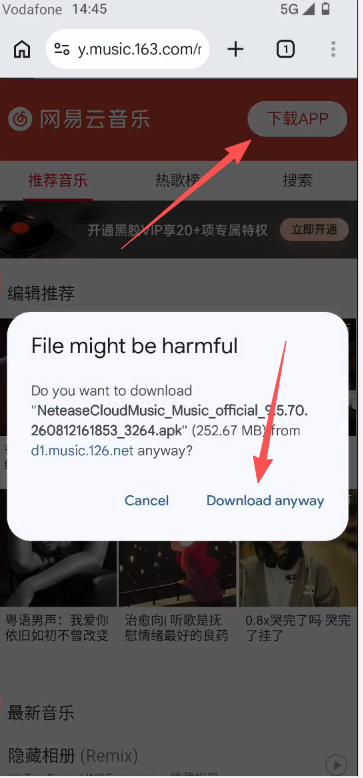
- The file size is about 252MB. Tap “Download anyway” to proceed.
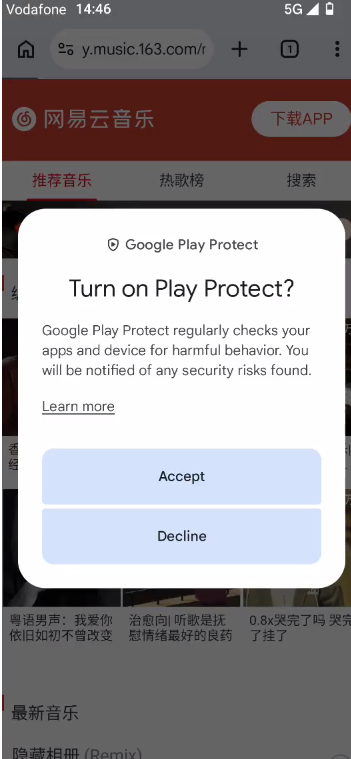
- If a Google Play Protect warning pops up, tap “Install anyway”.
Step 2: Install the App
- Once the download completes, tap the APK file to begin installation.
- Wait for the process to finish, then tap “Open”.
Step 3: Accept Terms & Permissions
- When the Terms of Service and Privacy Policy prompt appears, tap “Agree” (同意).
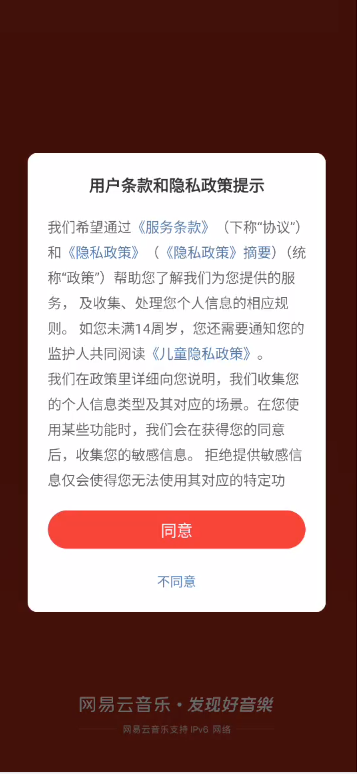
- For Notification Permissions, we recommend selecting “Allow”.
Step 4: Register / Log In
- Select Log in via Mobile Number (手机号登录).
- Country Code: The default is +86 (China). Tap to change it to your country’s dialing code.
- Enter your phone number and check the box to agree to the Terms of Service.
- Tap “Get Verification Code” (获取验证码).
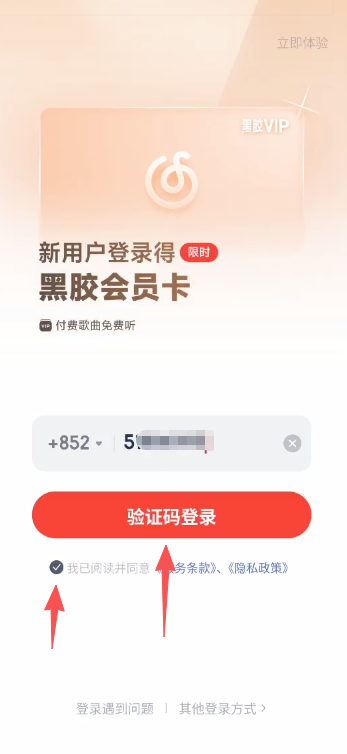
- Enter the 6-digit verification code received via SMS, then tap “Log In” (登录).
- If you didn’t receive it, tap “Resend Code” (重新获取).
Step 5: How to Use NetEase Cloud Music
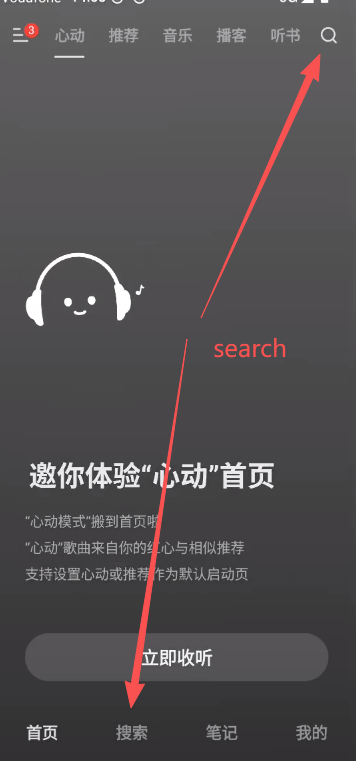
Search for Songs
- Tap the Search (搜索) icon at the bottom and enter a song or artist name.
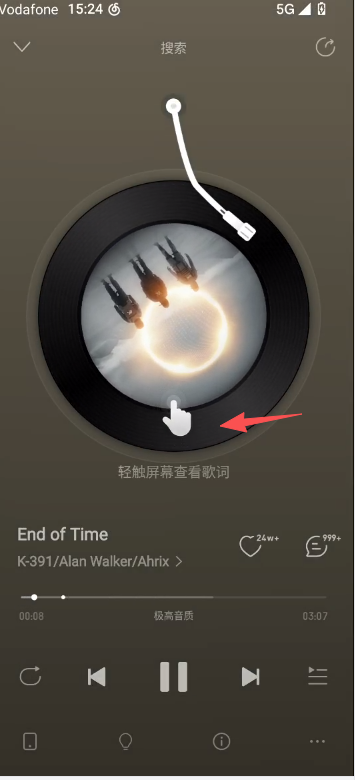
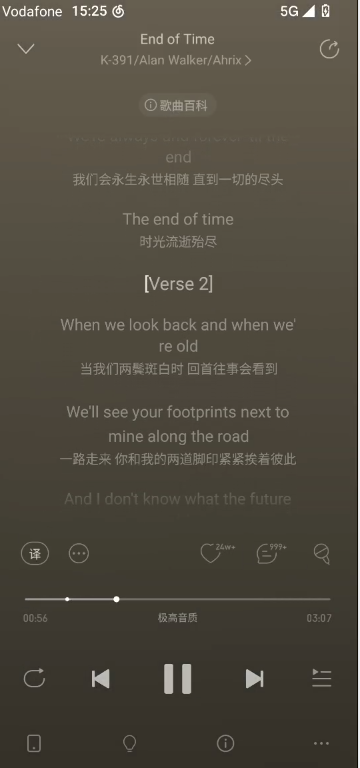
View Lyrics
- Tap the spinning vinyl record on the player interface to toggle and view lyrics.
Favorite a Song
- Tap the Heart (红心) icon to add your favorite tracks to your library.
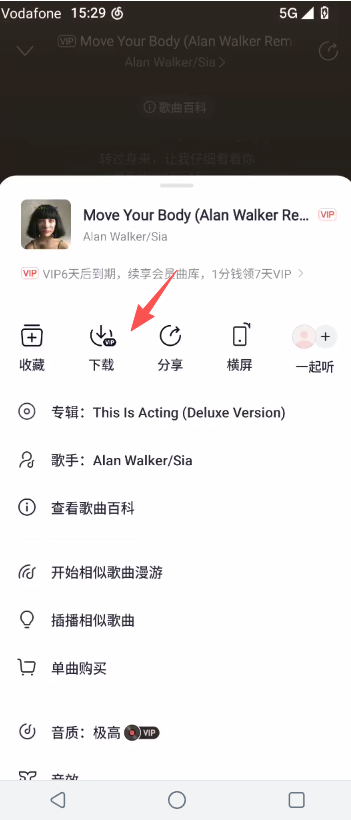
Download Songs for Offline Listening
- Tap the Three Dots (…) at the bottom right → tap “Download” (下载) to save music locally.
Comment Section
- Tap the Comment icon to read reviews and feedback from other users.
Karaoke / Singing Feature
- Tap the Microphone icon to enter the KTV/Karaoke mode.
Step 6: Subscription & Top-Up Service
How to Log In for Our Top-Up Service
- Tap the Menu icon (three horizontal lines) in the top left corner.
- Tap the QR Code Scanner icon.
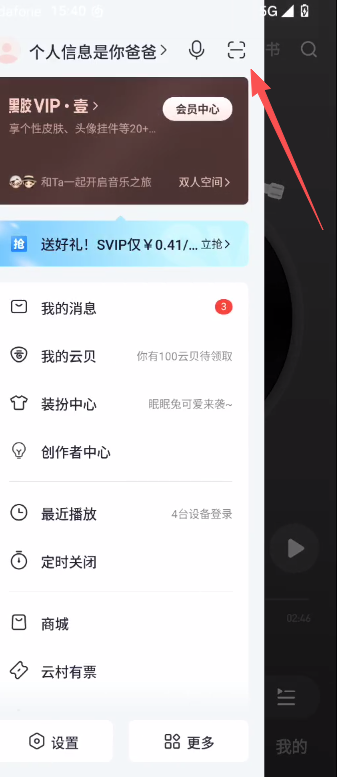
- Scan the login QR Code provided by our support agent via WhatsApp.
- We will complete the payment on your behalf using a local Chinese bank account/payment system.
- We accept payments via PayPal.
If the QR Code is saved in your Photo Gallery
- Tap “Gallery / Albums” (相册) on the scanner screen.
- Select the saved QR Code image from your phone.
- The app will automatically recognize it and prompt you to authorize the login.

Price Comparison: NetEase Cloud Music vs. YouTube Music vs. Apple Music
| Comparison Factor | NetEase Music – Vinyl VIP | NetEase Music – Vinyl SVIP | YouTube Music (US) | Apple Music (US) |
|---|---|---|---|---|
| Monthly Price (Converted) | ~$2.50 / mo (billed annually) | ~$5.50 / mo (billed annually) | $11.99 / mo | $11.99 / mo |
| Annual Price (Standard) | ~216 RMB / yr (~$30 USD) | ~480 RMB / yr (~$67 USD) | $143.88 / yr | $143.88 / yr |
| Savings vs. YouTube Music | 💸 Save ~$113/yr (Cost of a mid-range phone) | 🎧 Save ~$76/yr (Cost of good headphones) | — | — |
| Savings vs. Apple Music | 💸 Save ~$113/yr (Cost of a mid-range phone) | 🎧 Save ~$76/yr (Cost of good headphones) | — | — |
| Key Advantages | Vast Asian/Chinese music library, vibrant community, ultra-low price. | Master-quality audio, free digital albums/audiobooks included. | Integrated with YouTube videos, powerful algorithm. | Global library, Lossless audio included, Apple ecosystem integration. |
| Device Limits | 5 devices logged in, 1 streaming at a time. | 5-10 devices logged in, 1 streaming at a time. | 1 streaming at a time (Individual plan). | 1 streaming at a time (Individual plan). |
| Audio Quality | Lossless Quality (FLAC) | Hi-Res Master (192kHz/24bit) + Dolby Atmos | Up to 256kbps AAC | Lossless (ALAC up to 24bit/192kHz) |
Why Choose Our Top-Up Service?
The Challenge
- NetEase Cloud Music only accepts Chinese Bank Cards, Alipay, or WeChat Pay.
- International users outside China generally cannot pay directly on the platform.
- We bridge this gap by offering instant local payment processing at affordable rates!
How to Order
- Contact us on WhatsApp: +852 5100 6193
- Let us know your preferred plan (Vinyl VIP or SVIP / Monthly or Annual).
- Scan the login QR code we send to your chat.
- Complete your payment via PayPal.
- Your account top-up will be completed immediately upon confirmation.
Important Notes
- Subscriptions are non-refundable once activated.
- We recommend trying the 7-day free trial before purchasing a paid plan.
- Annual subscriptions offer the best overall value and savings.
Recommended VPNs & Accelerators for ChinaMALUS
Contact Us on WhatsApp: +852 5100 6193